

Scanning code for vulnerabilities is table stakes for many software companies. But what happens when a scan finds something. Does the finding get triaged, prioritized, and fixed? Or does it land in a backlog where it quietly sits until it's exploited?
The difference often comes down to one decision: do you block the merge, or just flag it?
What blocking actually means
A blocking policy prevents a PR from merging when a scan detects a high-risk finding. It is not a blanket gate that rejects every result produced. Teams choose which vulnerability categories warrant a hard stop, typically reserving blocking for their highest-risk, highest-confidence issues: hardcoded secrets, SQL injection in critical code paths, or critical reachable vulnerabilities in open-source dependencies.
Most application security tools give you some version of these enforcement levels:
Ignore: Finding is suppressed. No action taken.
Monitor: Finding surfaces in a dashboard for review, but has no impact on the PR.
Comment: Finding is posted as a PR comment so the developer sees it in context. Merges are not blocked.
Block: PR cannot merge until the finding is resolved.
Blocking operates at merge time, typically through your CI/CD pipeline or a cloud-hosted scanning integration. The enforcement happens at the point where code enters the shared codebase.
What the data shows
We wanted to understand what separates teams that actually fix vulnerabilities from teams that don't. Semgrep's Remediation at Scale report analyzed patterns across tens of thousands of actively developed repositories. One finding stood out: leading teams that block PRs on high-risk findings fix 12% more of their vulnerabilities than teams that only monitor.
45% of top-performing organizations use at least one blocking policy for SAST findings, compared to 32% of everyone else. But adoption alone does not explain the performance difference.
Teams who block see a fix rate of 55.9% on findings covered by blocking policies, versus 43.6% on non-blocking findings. The field sees only a 5% lift from the same feature.
The tooling is identical. The difference is organizational readiness to act on the signal. Blocking only works if teams are prepared to fix what gets blocked.
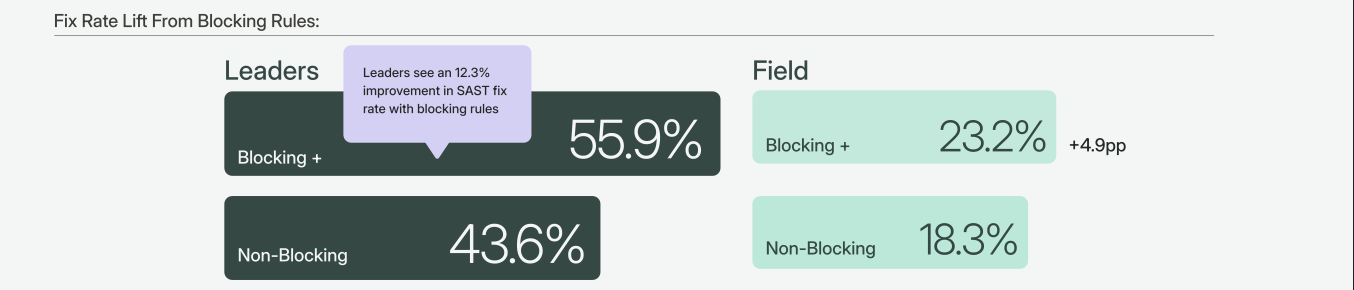 Source: Section 6.1, Remediation at Scale: What High-Performing AppSec Teams Do Differently
How blocking applies to first-party code vs. dependencies
Blocking serves different purposes depending on whether the finding is in code your team wrote or in a third-party dependency.
First-party code (SAST): When a SAST scan flags a vulnerability in a PR, the developer who introduced it is already looking at the code. The context is fresh. The fix ships in the same PR. This is the strongest case for enforcement.
Third-party dependencies (SCA): SCA findings are different. A vulnerability exists in a package your team imported, and the fix usually means upgrading the dependency version. Blocking every SCA advisory would generate noise that developers will learn to work around. Instead, use reachability data to decide what to block. Reachability analysis determines whether your code actually calls the vulnerable function in a dependency. If the vulnerable code path is reachable, that finding is worth blocking on. If the CVE is present but unreachable, it can be deprioritized to a scheduled review.
Semgrep's Supply Chain product does this automatically: it confirms whether the vulnerable code path is reachable before surfacing the finding, so you're only blocking on evidence-backed results.
A rollout strategy that preserves developer trust
Turning on blocking across your organization overnight is the fastest way to erode developer trust in your security program. The most successful teams follow a phased approach that builds confidence in the signal before introducing enforcement.
Phase 1: Monitor. Enable scanning and surface findings in your security dashboard. No impact on PRs. Use this phase to establish a baseline: how many findings are you detecting, in which categories, and at what severity levels? This is also where you evaluate your false positive rate. If the signal is noisy at this stage, address that before moving forward.
Phase 2: Comment. Post findings as PR comments. Developers see the findings in context while reviewing their code, but merges are not blocked. This builds awareness of what the scanner catches and gives your team a preview of what enforcement would look like. Pay attention to whether developers engage with the comments or dismiss them.
Phase 3: Block selectively. Start with 3 to 5 high-confidence, high-severity findings. Good candidates for your first blocking policies:
Hardcoded secrets and credentials (high confidence, clear fix action)
SQL injection or other injection flaws in critical code paths (high severity, well-understood fix pattern)
Critical SCA vulnerabilities confirmed as reachable (evidence-backed, high signal)
In Semgrep, this is a policy configuration change: you select the rules, set them to Block mode, and the enforcement applies to every PR scan going forward. Semgrep Managed Scans handles this without requiring any CI/CD pipeline changes.
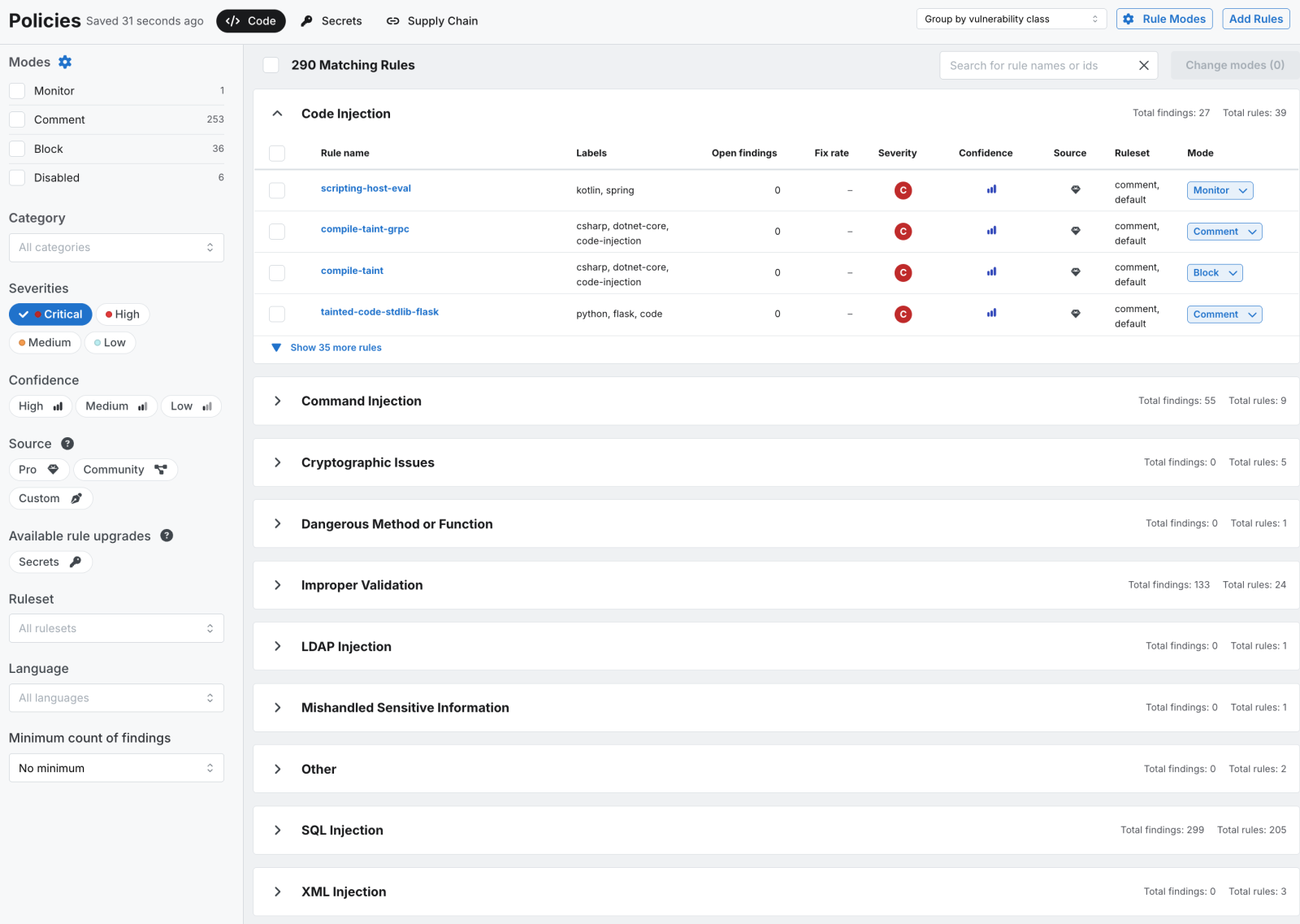 Source: Semgrep Dashboard /policies tab
What NOT to block: Low-severity informational findings, stylistic or best-practice suggestions, findings in test or development-only code paths, and SCA vulnerabilities that reachability analysis has confirmed are not exploitable in your environment. Blocking these categories generates friction without proportional security value. It trains developers to treat blocked PRs as noise rather than signal.
Start with five rules
Pick your five highest-confidence blocking candidates. Run them in comment mode for two weeks. Review the findings with your team: are these true positives? Are developers engaging with the comments? Then flip those five to blocking. Monitor the results, expand coverage gradually, and add new blocking rules only when you have confidence in the signal quality.
The Remediation at Scale report also found a 90-day remediation cliff: findings that sit in the backlog for three months or longer have a significantly lower probability of ever being fixed. Blocking is one way to prevent findings from reaching the backlog in the first place.
The full report covers six data-backed strategies that separate high-performing AppSec teams from the rest. Blocking policies are one of them. Download the Remediation at Scale report for the complete findings.