In 2024 the FTC started fining companies for lying about AI. Its Operation AI Comply sweep went after a self-described "robot lawyer" that was never trained on legal materials and "AI-powered" schemes that defrauded people of millions. The agency's message was blunt: there's no AI exemption from the law, and putting "AI" on a product you never actually changed is deceptive.
Every vendor deck says "AI-native" now — pitch slides, product pages, keynote backdrops. Say a phrase enough times and it stops meaning anything. We're past that point.
Security engineers tend to smell this coming. We sat through "next-gen" and "behavioral detection." Both started as real ideas and ended as checkboxes nobody trusted. AI-washing is the same move: take an old product, sprinkle the new vocabulary on top, ship it. It's already a recognized pattern in application security.
The real question isn’t "Do you use AI?". Everyone claims they do. Instead, try asking: if you removed the AI, would the product break, or would it look like it did three years ago?
This framework works on any vendor, including tools you already own.
What "AI-Native" Actually Means (and What It Doesn't)
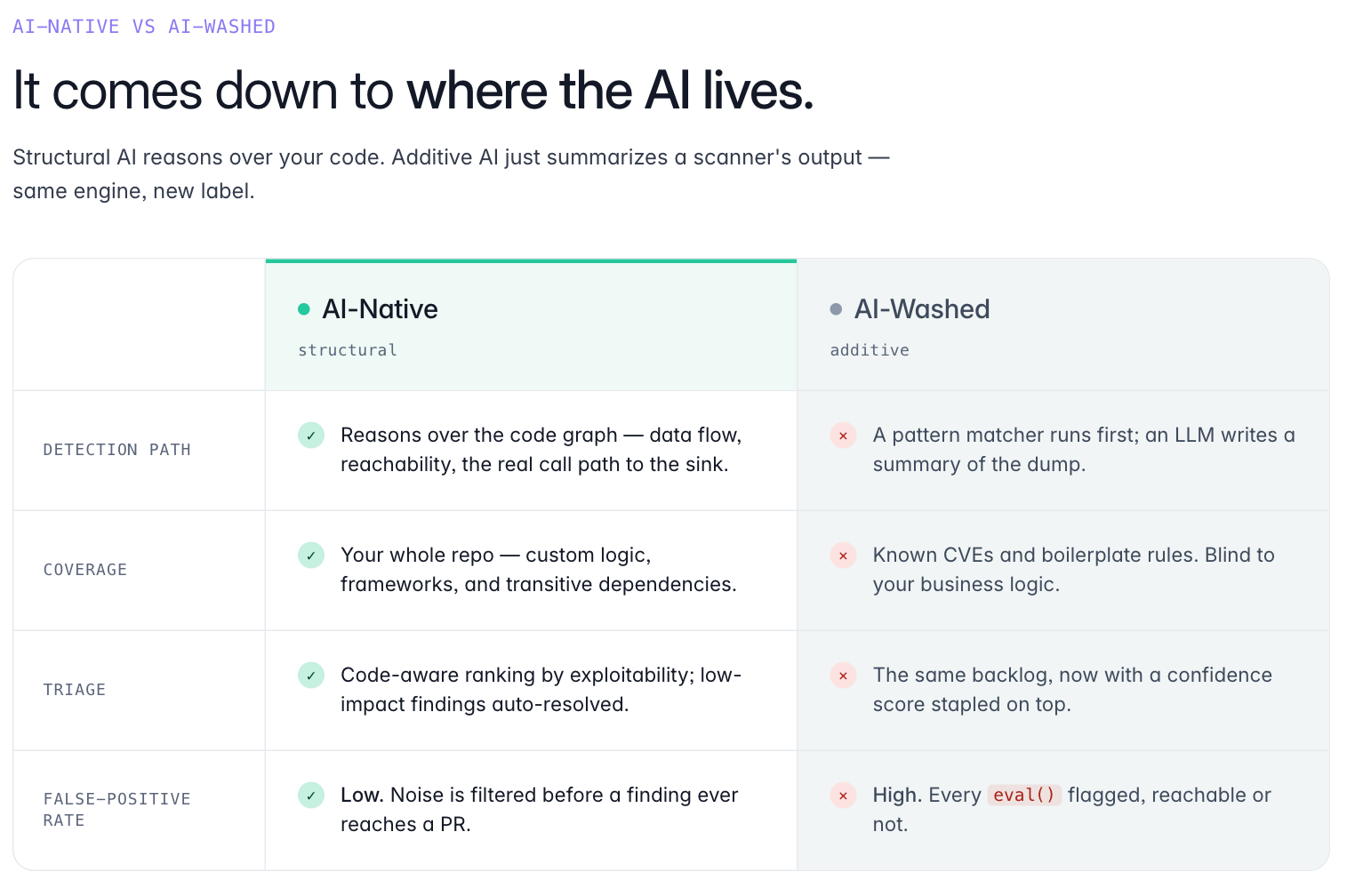
AI native (similar to predecessors like mobile native, web native, etc.) implies that AI was considered at original construction: the analysis pipeline, the detection logic, the triage call, the way coverage gets built. Rip those out and the product is meaningfully worse, or doesn't run at all.
An AI-washed tool is the opposite. The engine underneath, usually a static analyzer written years ago, does exactly what it always did. Someone wrapped it in a chat box, added an "explain this finding" button, and changed the marketing copy to say "AI-powered." Same engine, new sticker. Nice try.
Here’s a one-line test. Ask what the tool did before the AI features shipped. If the honest answer is "basically the same thing," it's a wrapper.
A growing share of production code is now written with AI help, and that code fails in its own ways. It repeats certain mistakes and skips the context a developer would carry in their head. A scanner tuned for pre-AI codebases isn't broken. The landscape shifted beneath it, and any legacy tool that remains static is now operating with significant, invisible blind spots.
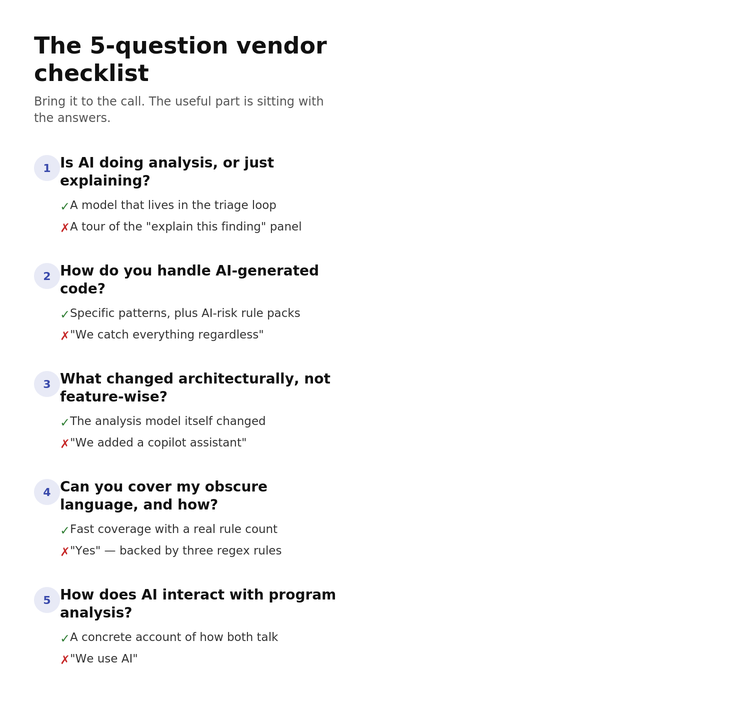
1. Is AI doing the analysis, or just explaining the results?
This is the most important one, so lead with it. In a real AI-native tool, the AI helps decide what counts as a finding. It's in the detection path. In a washed tool, the AI shows up after the verdict, narrating a result the legacy scanner already produced.
The gap shows up in your false-positive rate. An LLM summary can be clear, confident, and well-written while describing a false positive the scanner never should have raised. Fluent narration doesn't make a finding real. If the AI can't bring the noise down, it isn't doing analysis.
I once asked "how does your model cut noise?" and got a tour of the explain-this-finding panel. That's a non-answer. A real answer describes a model that lives in the triage loop and changes which findings reach a human.
2. How does the tool handle code written by AI models?
Ask for specifics. What patterns do code generators introduce that the tool is built to catch? Does it impact detection results when a line of code originates from a chat prompt rather than a developer's direct intent?
Vague answers are the signal here. We don’t need to know whether a specific line was written by a human or generated by an AI model in order to analyze it. The code is still code. But we do pay attention to the kinds of insecure patterns that appear more often in AI-generated code, and we tune rules, tests, and prioritization around those patterns.
"We catch all vulnerabilities regardless of how the code was written" might be true and still dodge the point: AI-generated code produces vulnerability patterns at different rates than human code does, and a tool either accounts for that or it doesn't. Ask about AI-specific risks too, like prompt injection or unguarded tool use.
3. What changed architecturally when you added AI?
This is the one vendors least want to answer concretely. Ask for specifics.
"We added a Copilot-style assistant." "You can ask questions about your findings." Those are features. AI got stapled to the edges and never reached the core—like building a Death Star, but without the actual planet-destroying laser.
An architectural answer sounds different. The analysis model itself changed. Coverage reached languages or frameworks that weren't worth supporting before. The rule pipeline got rebuilt so new detections no longer cost years of specialist labor. If the change is real, the vendor can point at the part of the system that's different now.
4. Can it cover your obscure language or framework, and how?
Legacy static analysis has a coverage tax. Every new language or framework means specialists hand-writing rules, which is slow and expensive. Vendors chase the high-volume languages and leave the long tail thin.
AI-native tooling should loosen that constraint. When a vendor says "yes, we support that," follow with "how did you build it?" A multi-year effort, or something the architecture actually enables? One sharp follow-up: ask how many rules back that support. "Supported" can quietly mean three regex patterns and a prayer.
The shape of the answer tells you whether the AI is structural or decorative.
5. How does AI interact with program analysis in the detection pipeline?
Pure LLM detection has a precision problem. Models reason about code well, then hallucinate a data flow that isn't there, with none of the guarantees formal analysis gives you. Pure static analysis has the opposite problem: it misses things that need context or intent to spot.
The good tools run both and let each cover the other's weakness. So push on the balance. If the answer is just "we use AI," ask where program analysis fits. If it's "we use program analysis," ask where the AI fits. You want a concrete description of how the two talk to each other. If the vendor can't give one, that's your answer.
What Genuinely AI-Native AppSec Looks Like in Practice
When AI is load-bearing, it changes what the tool can do, not just how the dashboard looks. Things to focus on:
Analysis that understands the unique patterns of AI-generated code. And not just AI-specific bugs like prompt injection. The broader reality that AI-assisted development reshapes the whole codebase, and the scanner accounts for that shape.
New language or framework support in weeks instead of years is a strong tell that AI is doing structural work. If new coverage still costs the same specialist effort it always did, the AI is speeding up old work, not changing what's possible.
Does the triage cut noise without your team hand-training it? False positives are where a lot of AppSec programs quietly die. Developers learn to ignore the tool, and it may as well not exist. If the AI doesn't visibly move the false-positive rate, it isn't solving the problem that matters.
Processes that empower developers without requiring constant security oversight. AI-native tooling hands developers enough context to close a finding themselves, in the pull request or IDE, without a security engineer in the loop for every ticket.
Why This Matters Right Now
The AppSec market is consolidating. Old vendors are bolting on AI; new entrants are building AI-first. The decisions you make now will likely stick for three to five years.
If you evaluate with real criteria now, you’ll land on the right side of that cycle. If you pick based on whose "AI-native" slide looks the best, there's a decent chance you're back here in 18 months — having bought a wrapper around the engine you were trying to leave.
The criteria exist. The questions aren't hard. You just have to ask them and listen.
Conclusion
Before you sign anything, ask:
Is AI in the detection path, or the UX layer?
How does it handle AI-generated code specifically?
What changed architecturally, not just feature-wise?
Can it cover the languages that weren't viable before, and how?
How does AI interact with program analysis?
Run it on any tool, Semgrep included. If the answers are concrete, something real is happening under the hood. If they're not, you already know.
Point the same checklist at us. On detection versus narration, Semgrep Multimodal puts AI in the triage loop, not just the summary. For AI-generated code, Semgrep Guardian scans it as it's written inside tools like Claude Code and Cursor. On coverage, the supported languages list and custom-rule editor let teams extend support without years of specialist work. And on AI versus program analysis, Semgrep Code pairs a deterministic engine with LLM context with findings surfaced right in the PR or IDE.
FAQ
What does "AI-native" mean in application security?
An AI-native AppSec tool is one where AI is essential to how the product analyzes code, not a feature added on top of a legacy engine. In practice that means AI is involved in detection, triage, rule generation, or coverage, not just in summarizing results or writing reports.
What is AI-washing in cybersecurity?
AI-washing is when a product claims to be AI-powered without changing how it works underneath. Common forms: LLM-generated summaries of legacy scanner output, a copilot chat feature added to an otherwise unchanged product, and rebranding an existing static analysis engine as "AI."
How can I tell if a security tool is truly AI-native?
Ask whether AI is in the detection path or just the UX layer, how the tool handles code written by AI models, and what changed architecturally rather than feature-wise when AI was added. Vendors who can answer those concretely are more likely to be the real thing.
Why does AI-native matter for AppSec specifically?
A large and growing share of production code is now written with AI assistance. Tools trained on and designed for pre-AI codebases have structural gaps. AI-native tools can adapt to new patterns, extend coverage to more languages, and cut the manual overhead it takes to scale a security program.