
In the first part of this series, I argued that after more than two decades, we should retire Cybersecurity Awareness Month and replace it with Cybersecurity Readiness Month. Awareness was a reasonable goal in 2004. In 2026, nobody needs another reminder that attackers exist, phishing is bad, or reusing the same password everywhere might not be the best idea.
So if we're going to replace awareness with readiness, we should define what being ready actually means. It doesn't mean never clicking a phishing link, losing a phone, getting malware, or having an account compromised. That's not readiness, that's fantasy. Readiness means knowing what to do before an incident happens.
Security Advice Usually Stops Too Soon
Most personal cybersecurity advice focuses on prevention. Use strong passwords. Turn on MFA. Don't click suspicious links. Update your software. Back up your files. All good advice. The problem is that it usually ends right when things get interesting.
What happens when you do click the link? When your password is compromised? When your phone disappears? When somebody gets into your primary email account and starts resetting everything? Face it, we are all humans, we all make mistakes. If you don't have a plan for when things go sideways, you have optimism with a password.
Real security assumes something will eventually go wrong and prepares for what happens next.
Start With What Actually Matters
Security people have a bad habit of treating every possible threat as equally terrifying. We do this professionally too. Give us 10,000 vulnerabilities and we'll find a way to put 9,997 of them into the "critical" bucket. Personal security should start with the same question good security programs should ask, “What can actually hurt me?”
Your primary email account matters more than your login to a message board you joined in 2012. Your bank account matters more than your pizza delivery account. Your password manager, Apple or Google account, cloud storage, mobile phone account, and anything controlling your identity or money deserve more protection because compromising them gives an attacker somewhere useful to go next.
Think in terms of reachability. If someone gets into this account, what can they reach from there? Compromise someone's primary email and you potentially gain the password-reset mechanism for dozens of other services. The first compromise is just the doorway.
Identify the accounts everything else depends on and protect those first. Use strong unique passwords or passkeys, enable MFA, keep recovery information current, and store backup codes somewhere you can find them. Not every risk deserves the same amount of your time. Spend it where compromise has consequences.
Assume Someone Is Going to Get a Password
Passwords get stolen. Websites get breached. People get phished. Infostealers grab credentials. None of this is breaking news. The goal shouldn't be constructing a password so complex that no attacker will ever defeat it. The goal is making a stolen password insufficient.
Use a password manager so important accounts get unique credentials. Use passkeys where they make sense. Turn on MFA, preferably phishing-resistant MFA for the accounts that matter most. If a site is still asking security questions like your mother's maiden name, don't answer them like questions. Treat them like additional passwords and give them answers nobody can guess.
The real test isn't whether a password can be stolen, but how much damage that stolen password can do. If one compromised credential opens the door to everything else, your problem isn't the password. It's everything connected to it.
Your Phone Is Part of Your Security Perimeter
For most people, myself included, their phone has quietly become the keys to their digital life. It receives authentication prompts, may contain your password manager, and probably has access to your email, financial apps, messages, photos, and cloud accounts. Losing it isn't just losing a $1,000 rectangle. It's potentially losing an authentication device.
Prepare before that happens. Use a strong device PIN and biometric authentication. Configure remote tracking and wiping, which are offered by both Apple and Android. Protect your mobile carrier account against unauthorized changes and SIM swaps (Check with your carrier). Make sure you can recover important accounts without relying entirely on the device that's missing.
Now imagine your phone disappeared. Could you access your important accounts from another device, remotely lock or wipe the phone, and recover your MFA without it? Don't wait until you're standing in an airport wondering where your phone went to figure this out. Take a few minutes now to check your recovery options, save your backup codes somewhere secure, and make sure you know how to lock or wipe the device remotely. That's what readiness looks like.
Backups Don't Count Until You Restore One
Everyone knows they're supposed to have backups. Far fewer people know whether those backups actually work. Photos, financial records, tax documents, work, writing, source code, whatever matters to you should exist somewhere other than the device sitting in front of you.
Cloud synchronization is useful, but don't confuse syncing with backup. Sync is designed to copy changes everywhere, including bad changes. If you delete a file by mistake that deletion may sync, leaving you without the file. If malware encrypts or corrupts your files and those changes also sync, your compromised laptop has now ruined everything. A real backup gives you somewhere clean to go when the synchronized copies can no longer be trusted. Keep a separate copy of what you can't replace, and make sure you can actually restore it. (Follow a 3-2-1 backup strategy.)
A backup you've never tested is just a theory. If your security control doesn’t work when it is needed then does it even exist?
Know What You'll Do After the Click
Eventually, somebody clicks. Maybe it's you. Maybe it's your spouse or your kid. Maybe the phishing email is extra believable because attackers have discovered AI and no longer need to write emails that sound like they were translated through six different languages, a three year old, and a toaster.
The worst response to clicking the wrong thing is panic and then doing nothing. If you entered a password, change it and revoke active sessions. If you downloaded something suspicious, disconnect the device from the network and get help. If financial information was involved, contact the financial institution. If an account was compromised, check its recovery information and connected applications.
Speed matters. The goal isn't to become a forensic investigator. It's to recognize that something happened and know your first few moves. Fire drills don't teach everyone to become a firefighter. They teach people how to exit a burning building safely. Personal cybersecurity should work the same way.
Give Yourself a Readiness Test
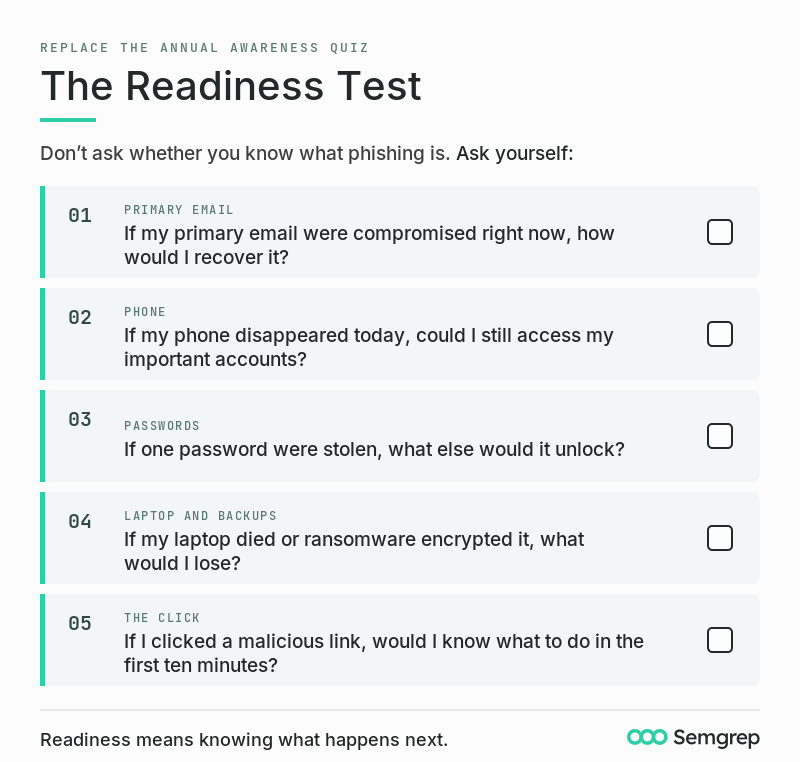
Here's my replacement for the annual cybersecurity awareness quiz. Don't ask whether you know what phishing is. Ask yourself: If my primary email were compromised right now, how would I recover it? If my phone disappeared today, could I still access my important accounts? If one password were stolen, what else would it unlock? If my laptop died or ransomware encrypted it, what would I lose? If I clicked a malicious link, would I know what to do in the first ten minutes?