Semgrep Workflows (beta)
Semgrep Workflows is a framework for building automated code security pipelines that allow you to detect, triage, and remediate security issues.
Each workflow is a series of steps, defined in Python, that include deterministic tools such as Semgrep Code, Supply Chain, and Secrets, as well as Semgrep Multimodal. You can also integrate third-party tools and any custom tooling required. Once you’ve defined your workflow, Semgrep handles its deployment and execution at scale.
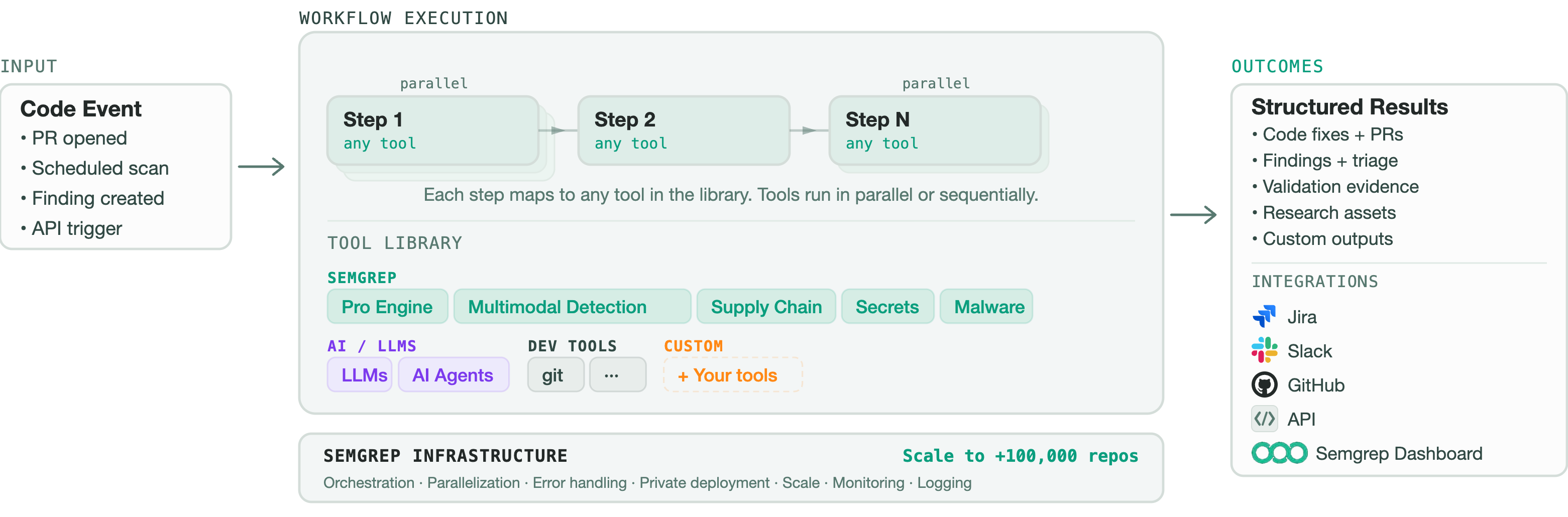 Figure. Architectural overview of Semgrep Workflows.
As input, Semgrep workflows take your project code and security context. This includes your organization's risk tolerance, findings triage rules, and other internal security program logic and definitions. The workflow is triggered by actions such as:
- The opening of a pull request (PR) or a merge request (MR)
- A scheduled scan
- An API call
Semgrep then runs security tools, such as static analysis, software composition analysis, and secrets detection, and applies LLM-backed analysis on your project. The resulting security findings, triage decisions, research artifacts, and code changes are provided to you in a structured, actionable format.
Types of workflows
Semgrep provides built-in workflows you can run immediately, or you can define custom ones for your organization's needs. All workflows deploy on Semgrep’s managed infrastructure, minimizing your operational overhead.
Semgrep's pre-built workflows, covering common use cases, include:
- Insecure direct object references (IDORs) and broken authorization: combine static analysis and AI detection to find broken authorization, authentication bypasses, insecure access patterns, and other business logic issues
- Triage: filter out false positives from your results to help your security teams prioritize real issues
- Autofix: turn dependency findings into actionable remediation guidance, including information on whether the upgrade is safe or requires code modification
You can integrate any of these workflows individually, combine them to implement the functionality you need, or use them all to create an end-to-end security workflow for your organization. Alternatively, you can define custom workflows to meet your organization's needs. You can adapt a pre-built Semgrep workflow for your organization, or create entirely new ones using the Semgrep agent SDK.
Custom workflows
Semgrep workflows are defined using Python and have a clear structure that includes steps, tool decorators, and standard control flow. This structure makes it straightforward for AI assistants to generate, modify, and extend your workflows -- you can describe what you want your workflow to do in natural language, and the AI assistant presents you with a draft workflow.
You can run workflows locally for testing and iteration, on Kubernetes with a single deploy command, or through CI/CD systems like GitHub Actions or GitLab CI. Semgrep’s managed infrastructure handles orchestration, optimization, and monitoring regardless of deployment method.
Custom workflow patterns include, but aren't limited to, the following:
| Workflow | Description |
|---|---|
| Detection | combine Semgrep with other security tools, project code context, and LLM-assisted reasoning to identify patterns that your organization deems important but can't be categorized neatly into generic, out-of-the-box rules |
| Policies | encode internal security and compliance logic, then run it across multiple environments and repositories |
| Remediation | generate upgrade guidance, code change suggestions, and PRs with the context developers need to fix issues safely |
| Triage | review findings from a scanning tool while using repository context and custom review logic to produce decisions about the validity and priority of the findings |
| Validation | review suspected issues with additional checks to determine if the issues are exploitable or worth escalating |
Get started
To get started with your first automated workflows, contact Semgrep.
Not finding what you need in this doc? Ask questions in our Community Slack group, or see Support for other ways to get help.